


Blog

Should Educators worry about Windows 7?

Steve Waddell • January 14, 2020

Educator Warning, as of January 14, 2020, Windows 7 on your school and personal systems will no longer receive security updates or technical support from Microsoft. 

Here is what is really scary… 26% of the computers in the world are still running Windows 7. How many of them are in your school? Your guess is as good as mine. But there is a way to find out without bugging the IT department. 

Should Educators worry about Windows 7?

Windows 7 Start Button

As we know, education sometimes lags behind industry in keeping up with software changes. I can’t blame the school IT departments as they are always understaffed, underfunded, and not always well supported by their administrations. The reality is for some districts when you are struggling to find the funds to buy copy paper. Updating operating systems can seem like an extravagance.

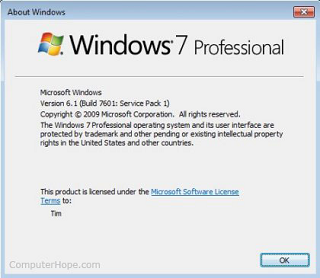
Example Windows 7 Version Page

However, at this point, if the computers in your lab are running Windows 7, then you need to be aware that as of 01/14/2020, the Windows 7 operating system from Microsoft will no longer receive security updates or any support what so ever. You may not be able to change the situation, but you can at least be ready and aware. 


How do I check my school computers? 

Method One

Click on the Start button (lower left of your Windows screen)

Type into the Start Menu’s Search Box  winver   

Press Enter

If the version page refers to Windows 7 Home or Windows 7 Professional, then there is your answer.

Windows 7 Start Search Box

Method Two

An alternative method (depending on your system permissions), you can right-click on the desktop screen and click on Display Settings. This will bring up a window and you can look on the left side menu and click on About. About will list some Windows Specifications, one of which is “Edition,” and this will be either Windows 7, 8, or 10. 


What does this mean? 

Well, without Microsoft updating the Windows 7 operating system, it first means that systems with Windows 7 will become more vulnerable to viruses and cyber-attacks (even with anti-virus software in place). Microsoft will cease give technical support for Windows 7. This means that if something terrible happens – well, you and your school are on your own. Companies that provide some software you use will stop updating their software to maintain compatibility with Windows 7, and this will mean more vulnerability to your systems for you.  

Should our clients be worried if they have Windows 7?

Good news, since most of our interactive courses run on the web from our platform and have zero footprints on the local computer and use our web-based creative tools, our clients should feel relatively safe. We can’t speak for any other company’s products. However, if you are one of our clients and are not sure if you have a Windows 7 system, or if you have questions about how your curriculum will continue to run on an out of date Windows 7 system, then reach out to us. We can talk you through it and help you understand all of this as best as we can. . computer science is not that hard to learn

Lead Developer – Steve

Share To

Get in touch with us today!


You can book a demo directly using Calendly, call us directly at 913-764-4272 or 877-828-1216, or submit the form and we will reach out to you.


We look forward to helping you and your students.

students with STEM certifications

Most Recent Posts

High school students earning industry-validated web professional credentials with a 94 percent pass
By Steve Waddell February 13, 2026
Secure your CTE program’s future. Explore 2026 Perkins V strategies for industry-validated credentials, hardware equity, and measurable workforce readiness.
By Steve Waddell February 3, 2026
Avoid expensive hardware refreshes. Move your animation lab to a 100% web-based curriculum that runs on any device and includes free industry certifications.
student using web design curriculum
By Steve Waddell January 22, 2026
Solving the biggest challenges in teaching web design. Learn how CTeLearning’s turnkey curriculum overcomes the expertise gap, budget cuts, and IT hurdles.